
Last updated on
Oct 31, 2026
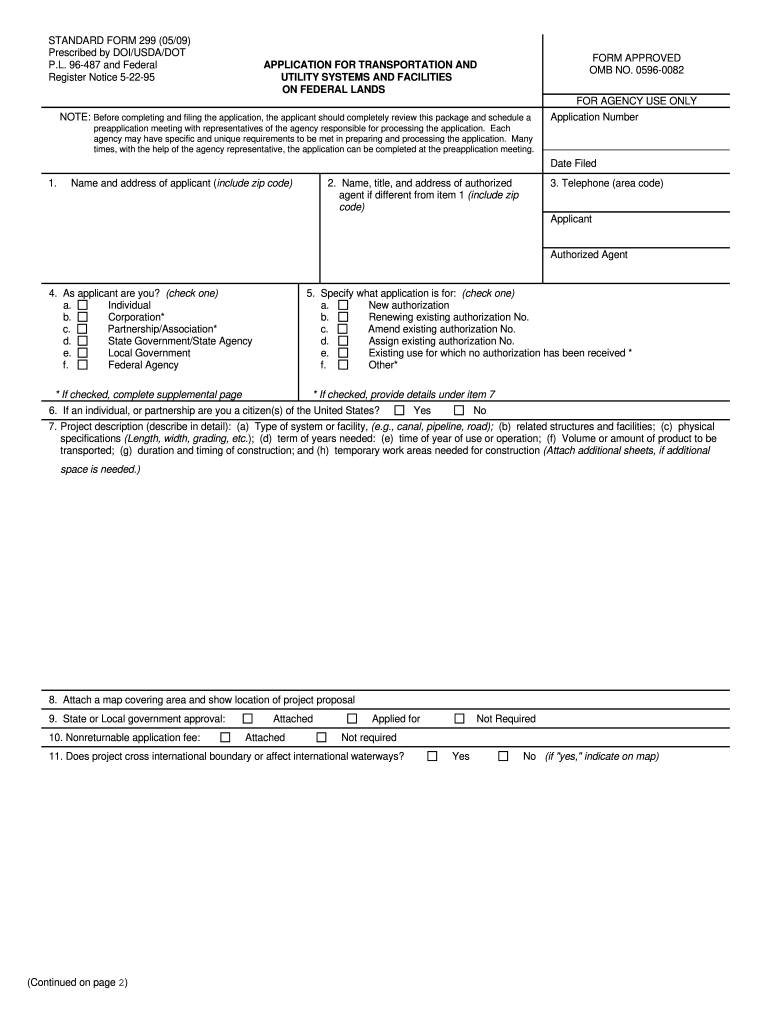
USDA SF 299 2009 free printable template
pdfFiller is not affiliated with any government organization

Fill out
Complete the form online in a simple drag-and-drop editor.

eSign
Add your legally binding signature or send the form for signing.

Share
Share the form via a link, letting anyone fill it out from any device.

Export
Download, print, email, or move the form to your cloud storage.
Why pdfFiller is the best tool for your documents and forms


End-to-end document management
From editing and signing to collaboration and tracking, pdfFiller has everything you need to get your documents done quickly and efficiently.
Accessible from anywhere
pdfFiller is fully cloud-based. This means you can edit, sign, and share documents from anywhere using your computer, smartphone, or tablet.
Secure and compliant
pdfFiller lets you securely manage documents following global laws like ESIGN, CCPA, and GDPR. It's also HIPAA and SOC 2 compliant.
What is USDA SF 299
The Standard Form 299 is a federal application used by individuals and organizations to request permits for transportation and utility systems on federal lands in Alaska.
pdfFiller scores top ratings on review platforms




Who needs USDA SF 299?
Explore how professionals across industries use pdfFiller.

USDA SF 299 is needed by:
-
Utility companies planning new projects
-
Contractors seeking permits for infrastructure
-
Government agencies overseeing land use
-
Environmental consultants preparing assessments
-
Landowners requesting access to federal lands
-
Infrastructure development firms
Comprehensive Guide to USDA SF 299
What is the Standard Form 299?
The Standard Form 299 is a crucial federal application utilized for transportation and utility projects on federal lands, particularly in Alaska. It serves to formalize requests for rights-of-way, permits, licenses, and leases necessary for infrastructure developments. Various projects including pipelines and roads typically require this form to comply with federal regulations and planning.
This form is essential for entities operating in federal lands, ensuring that significant undertakings align with existing policies and environmental standards. Understanding its purpose is vital for smooth application processing.
Purpose and Benefits of the Standard Form 299
The Standard Form 299 serves multiple purposes, facilitating the acquisition of essential permissions for utility and transportation systems. It is designed to streamline processes for applicants, enabling them to obtain rights-of-way and necessary permits efficiently.
This form also plays a significant role in ensuring that projects adhere to environmental regulations. With its structured format, it simplifies navigation through the often complex federal approval processes associated with various projects.
Who Needs the Standard Form 299?
Several stakeholders may need to complete the Standard Form 299, including utility companies, transportation agencies, and contractors involved in federal land projects. Primarily, these groups work on initiatives that require federal oversight for compliance and planning purposes.
Understanding the target audience for this form helps in determining the necessary steps towards effective completion and submission. Typical projects that necessitate this application include construction of utility systems and transportation infrastructure.
Eligibility Criteria for Using Standard Form 299
To be eligible for the Standard Form 299, applicants must meet specific criteria tied to their projects and federal land use regulations. Required characteristics often include the type of land in question and the nature of the project that influences eligibility.
-
Applicants must demonstrate a valid need for federal permissions.
-
Project proposals must be aligned with existing federal guidelines.
-
Special attention is required for projects located in sensitive environmental areas.
How to Fill Out the Standard Form 299 Online
Completing the Standard Form 299 online involves several clear steps. First, applicants can access the digital version of the form through a reliable platform. Once opened, it is crucial to fill out key fields, including project descriptions and environmental assessments, accurately.
-
Access the form through an online editor like pdfFiller.
-
Ensure all required fields are filled, highlighting project details adequately.
-
Utilize digital tools for easy navigation and submission of the application.
Common Errors and How to Avoid Them When Filling Out Standard Form 299
While filling out the Standard Form 299, applicants often encounter common pitfalls. Mistakes like missing signatures or incomplete project details can delay the application process significantly.
-
Review all entries for accuracy before submission.
-
Ensure every required field is completed to prevent rejections.
-
Double-check that all documents are included and properly organized.
Required Documents and Supporting Materials for Standard Form 299
Completing the Standard Form 299 requires several supporting documents to accompany the main application. Essential documentation includes maps, financial statements, and environmental impact assessments, which substantiate the application.
-
Include detailed project maps and diagrams.
-
Provide financial documentation supporting the project feasibility.
-
Attach environmental impact assessments demonstrating compliance with regulations.
Submission Process for the Standard Form 299
Once the Standard Form 299 is completed, it must be formally submitted to the appropriate federal agencies. Several submission methods are available to applicants, ensuring flexibility in how they choose to file their application.
-
Send the completed form via traditional mail to designated agencies.
-
Utilize online submission platforms for quicker processing.
-
Anticipate processing times and plan accordingly for follow-up inquiries.
Security and Compliance When Submitting the Standard Form 299
Data security is of utmost importance when submitting the Standard Form 299. Applicants must ensure that all sensitive information is protected throughout the submission process. Platforms like pdfFiller comply with critical regulations including HIPAA and GDPR, ensuring a secure experience.
-
Utilize document encryption to safeguard data during transmission.
-
Choose secure platforms for eSigning and submitting forms.
-
Regularly review compliance guidelines to maintain data protection standards.
Transform Your Application Process with pdfFiller
pdfFiller enhances the application process for users completing the Standard Form 299 by providing essential tools for form editing, eSigning, and collaboration. This platform offers an intuitive interface accessible from any device, making form management easier than ever.
By leveraging pdfFiller’s capabilities, users can simplify their application workflow and ensure timely submissions, maximizing their chances of project approval.
How to fill out the USDA SF 299
-
1.To begin, visit pdfFiller and search for 'Standard Form 299'. Click on the form to open it in the editor.
-
2.Familiarize yourself with the layout. Use the left panel to navigate through the form sections.
-
3.Gather required information beforehand, such as the project description, maps, and any necessary supporting documents.
-
4.Begin filling out the form by clicking into each field and typing the appropriate information. Make sure to follow all instructions provided.
-
5.Utilize checkboxes for any yes/no questions, ensuring they are completed correctly.
-
6.After filling out all sections, revisit each entry to verify accuracy and completeness.
-
7.Once satisfied with your form, you can utilize the review feature on pdfFiller to check for errors or omissions before finalizing.
-
8.To save or download the completed form, click on the 'Save' button. Choose to save it as a PDF or other preferred file formats.
-
9.Finally, submit the form as required by your specific federal agency instructions, either electronically or by mail.

Who is eligible to use the Standard Form 299?
Any individual or organization seeking a permit for transportation or utility systems on federal lands in Alaska can use Standard Form 299. Applicants must provide detailed project information and may need to consult with relevant authorities.
What is the deadline for submitting the Standard Form 299?
While the form itself does not have a universal deadline, specific project deadlines or agency requirements may apply. Be sure to check with the relevant agency for any critical timelines.
How do I submit the completed Standard Form 299?
After completing the form on pdfFiller, you can submit it electronically if the agency allows or print it out for mail submission. Follow the submission guidelines provided by the agency you are applying to.
What supporting documents do I need for the Standard Form 299?
Typically, applicants may need maps, environmental assessments, financial documents, and detailed project descriptions. Check agency requirements to ensure you include all necessary paperwork.
What common mistakes should I avoid when filling out the form?
Ensure that all fields are filled accurately and completely. Common mistakes include missing signatures, incorrect project descriptions, and failing to provide required supporting documents.
What is the processing time for the Standard Form 299?
Processing times vary depending on the agency and complexity of the application. It is advisable to inquire directly with the agency for estimated processing times.
Can I amend my Standard Form 299 after submission?
Yes, if changes are needed after submission, you should contact the relevant agency as soon as possible to inquire about their procedures for amendments or corrections.
USDA SF 299 Form Versions
Related Content
Related Forms


Related Catalogs
Get the latest insights from our blog


If you believe that this page should be taken down, please follow our DMCA take down process
here
.
This form may include fields for payment information. Data entered in these fields is not covered by PCI DSS compliance.